OpSage is a platform in active development, shaped by the realities of running restaurants at scale.
These release notes capture the full history of what ships — new features, architectural improvements, bug fixes, and security updates — so operators, IT teams, and anyone evaluating the platform can see exactly how it has evolved and where it is headed.

OpSage 0.9.20 — Every Alert Has an Owner
OpSage 0.9.19 — Critical Alerts in Your Pocket and a Map of Where the Problems Are
Release 0.9.18 - Forecasts That Show Their Work
Release 0.9.17 - Build It Once, Send It To Everyone
Release 0.9.16 - Share What You Build
Release 0.9.15 - Introducing OpSage Apps: Made To Order
Release 0.9.14 - OpSage Ask, Advanced Again
Release 0.9.13 — Weather-Aware Analysis, Reports That Send Themselves, and the Public Slack App
Release 0.9.12 — Guest Surveys, Sales Channels on the Dashboard, and a Simpler Toast Connection
Release 0.9.11 — Enterprise Access Controls Across Every Surface
Released: September 22, 2026
A street festival, a home game, or a road closure can change a restaurant's day as much as the weather. OpSage Daily now shows the events happening around each of your locations, day by day, so your team can plan prep and staffing around them and spot the nights worth a promotion. You can add your own events too, so the calendar includes what only your team knows about.
Technical Detail:
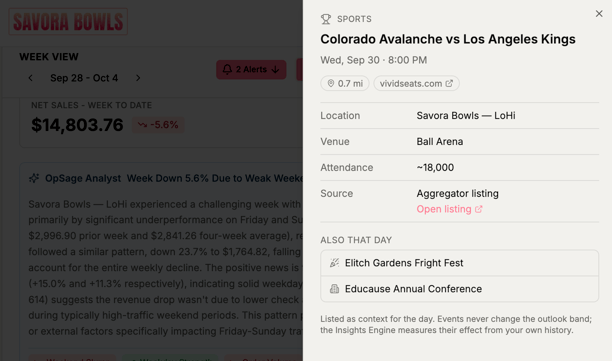 OpSage gathers events from holiday calendars, sports schedules, and local sources, matches them to nearby locations, and shows them next to the weather in the OpSage Daily week view. Mark an event not relevant to hide it for that location.
The new Events tab in Master Data replaces Dates and lets you add your own, such as a catering order or a large reservation. Managers can also turn an observation into an event.
On the dashboard, metric tiles and charts get drill downs, the territory map shades regions by performance, gauges show your targets, and a new "Assigned to me" widget lists your open alerts.
Connected AI assistants such as Claude can now look up events, insights, forecasts, and menu mix, and the release includes a set of reliability fixes.
Blog: Forecasting for Events Using OpSage Daily
Released: September 16, 2026
An alert helps only when someone picks it up. With 0.9.20 you can assign alerts to people or roles, hand off a task with instructions, or ask the team for help, and every alert keeps a record of who did what. Admins can also set rules so each type of alert goes to the right person automatically and clears out once it's no longer useful.
Technical Detail:
Every alert in the Alert Center now shows its owner. You can assign an alert to people or a role, claim one assigned to your role, delegate it as a task with a short instruction, or request help, and each alert keeps a history of those actions. The people involved are notified by email and in the OpSage Slack app at any severity, and alerts only go to people who can see the locations involved. Admins can set rules in Alert Settings by alert type to assign it automatically, adjust its severity, and decide how long it stays open. Expired alerts move to a new Archived view, resolved alerts archive after a day, and you can archive alerts by hand, one at a time or as a group.
Released: September 7, 2026
General managers spend their shifts on the floor, so this release sends the most important alerts to the phone in their pocket. It also adds a territory map that shows which regions have stores in trouble and lets you click through to the locations and numbers behind them. Building a dashboard is easier too, since every metric and chart now comes from a single widget catalog.
Technical Detail:
Each user can add and confirm a phone number in their profile, then choose which alert severity levels arrive by text and which by email. Text alerts cover problems like labor running high against sales, items dropping to zero, and a data feed that has stopped. If you received text alerts before this release, confirm your number to keep them coming. The new territory map shades each region using the states or provinces you assign in Master Data and pins every location as Good, Warning, or Critical on labor percent of sales against its own target. Click a region for a table of its locations, or click a store for its summary. Metrics and charts now share one dashboard canvas, added from a searchable catalog grouped by topic with a live preview of each widget. Alert Center, Brand Kit, and Master Data Inventory fixes round out the release.
Released: August 31, 2026
New dashboard widgets are built around how restaurants actually operate — product mix breaks down to individual modifiers, sales roll up by region and protein mix, and every widget keeps a simple headline view with drill downs several layers deep, rendered in the customer's own brand colors. Forecasts get the same treatment: instead of a single number, every location now sees an expected range for each day, sized to reflect the forecast's confidence and explained so operators can see where it comes from. The app itself reads more clearly too, with OpSage Daily now one click away in the main navigation.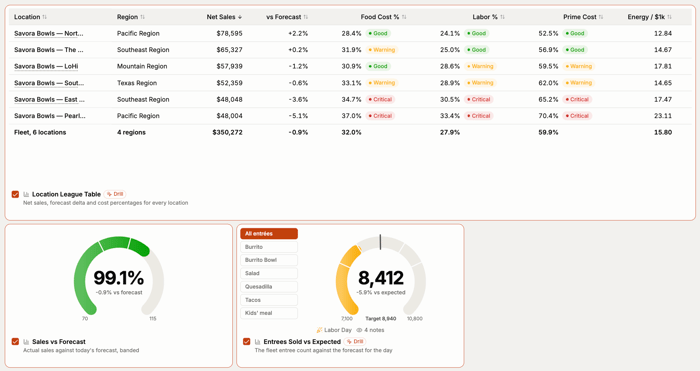
Technical Detail: Dashboard widgets now behave more like small purpose-built apps than generic charts, breaking product mix down to individual modifiers, rolling sales up by region and protein mix, and offering drill downs multiple layers deep behind a simple headline view, all rendered in the customer's own brand colors. Forecasting moves from a single point estimate to an expected range for each location and day, where the width of the range reflects how confident the forecast is and the forecast itself explains what it's based on, so operators can plan staffing and ordering against something they can actually see into rather than a number they have to take on faith. OpSage Daily now has its own spot in the main navigation with insights appearing directly on the page and in Reports, alongside a redesigned sticky header and section banners, alerts moved into the left navigation with an unread count, and a larger Brand Kit logo upload with a live preview.
Released: August 11, 2026
One report or dashboard now reaches an entire team in a single step and opens personalized for each person who receives it — a region manager sees their region, a location manager sees their restaurant, and the person who built it stays the only one who can change it. Paired with 0.9.16, sharing and personalization are two halves of the same idea: build once, and everyone who opens it gets their own version, automatically correct for the part of the business they run.
Technical Detail: Sharing a report or dashboard now resolves to the person opening it, so a single document reflects the locations someone is responsible for and the figures their role covers without a copy being built or maintained for each recipient. Authorship and viewing are kept as separate permissions — recipients open, read, and work with what was shared, while the person who built it remains the only one who can edit it, which is what makes distributing something to dozens of people practical rather than risky. This is the release that completes 0.9.16's sharing story: one dashboard, sent once, arrives correct for whoever opens it. Elsewhere in this release, a standard Sales Per Labor Hour widget now covers ground that used to require a custom build, and the catalog of data available to OpSage Apps has grown, so the apps your team describes can draw on more of the business without changing how you ask for them.
Released August 6, 2026
OpSage 0.9.16 lets you share what you build. Any dashboard or app can now go to your whole team, a specific role, or named individuals, and it stays live for the people you share it with — current numbers against their own access, not a snapshot of what you were looking at. Freeze a dashboard as a snapshot to keep a fixed record of a moment, like a period-end review or a franchise meeting. This release also rebuilds sign-in from the ground up, adds a home for the outside tools connected to your account, and strengthens the data guarantee behind OpSage Apps.
Technical Detail
Dashboard sharing lets an operator share with named individuals, everyone in a role such as region managers, or the whole company. Shared dashboards read live against the recipient's own access, so locations stay scoped to whoever is looking rather than whoever shared them. A Shared with Me section collects everything sent to a user, dismissed items move to a restorable archive, and a shared dashboard close to what someone wants can be copied and adjusted rather than rebuilt from scratch. Snapshots complement sharing by freezing a dashboard — including any OpSage Apps on it — exactly as it looked at the moment it was named; the platform reads back from the stored copy rather than re-running the underlying query, and a snapshot prints cleanly at full length with the app framing stripped out.
The dashboards page now opens to a gallery of templates with preview thumbnails, so an operator building an OpSage App can start from an existing pattern instead of a blank page. A Templates button in the header keeps the gallery available once it no longer needs to sit on every visit. Sign-in has been rebuilt to happen on the OpSage screen itself rather than redirecting out and back, and invitation links now land directly on the page they belong to. A new Connected Applications screen shows exactly what any connected outside tool is allowed to read, lets an operator disconnect anything with immediate effect, and calculates what a connected tool can reach from the approving person's role, so a connection never exceeds what that person could already see. OpSage now issues and validates its own access credentials rather than relying on an outside identity provider, and connecting an MCP client is limited to account owners and admins.
Customer and product records now carry their full daily detail through to OpSage Ask and to OpSage Apps, giving both a deeper base for questions about which items move together or how a group of guests behaves over time. OpSage Apps also gained a stronger data guarantee this release: an app renders an operator's actual figures or states plainly that it can't, rather than filling a gap with a placeholder number.
Several smaller improvements ship alongside the release: alerts are now visible to everyone on the team rather than the account owner alone, locations that share a name are distinguished by where they are so comparison charts stay readable, integration status badges update live during a manual sync, MCP connection URLs can be copied directly from the access token menu, and OpSage Ask and dashboards now open on the most recent period by default. A new automated test suite exercises dashboards the way an operator does — loading, filtering, and exporting them, then checking that a number on a tile matches the same number in a chart and in an exported file — and runs against every change from here forward. Dashboard sharing, snapshots, templates, and Connected Applications carry no per-user fees.
Blog:
Stop Screenshotting Your Dashboards to Your Team
Released July 20, 2026
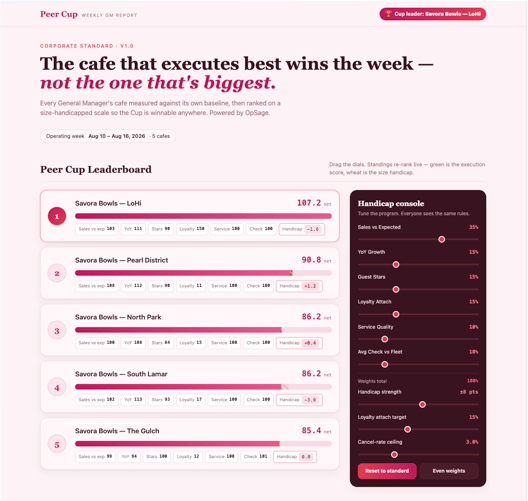
OpSage 0.9.15 introduces OpSage Apps, a new kind of tool you build by describing what you want. Instead of assembling a dashboard from a fixed set of widgets, you tell OpSage what you are trying to understand and it builds the whole thing, checks your actual data before it does, and keeps refining it whenever you ask. This release also rebuilds dashboards from the ground up, adds live-updating saved charts, and ships improvements to Prime Cost reporting and inventory management.
Technical Detail
Dashboards are now something you create rather than something you are given. Create, name, duplicate, and delete as many as you need from a single list: one per brand, one per region, one for the conversation you keep having with your team on Monday mornings. Metrics and charts belong to the dashboard you put them on, so a view built for one purpose stays focused on it. Everything you had on your original dashboard moves over automatically.
OpSage Apps go further than dashboards because they are built fresh for your request rather than assembled from a fixed widget library. Describe what you want: a prime cost target tool that turns red when you are over, a location ranking that blends sales trend, labor efficiency, and review rating, a lapsed-guest finder grouped by city with a slider for the day window. OpSage builds it against your actual data and reflects your locations and your numbers. Keep refining it the same way you built it: type what you want different and OpSage rebuilds while you watch. Every version is saved automatically so you can return to an earlier one at any point. Apps are built for a phone as much as a desk. Each app runs inside a restricted environment with no access to credentials and can only request data through an approved, validated list of sources. Access follows your existing roles, so each person sees only the data their role allows.
Saved charts from OpSage Ask now stay live on your dashboard. Each one keeps the written analysis from the original conversation and re-runs against your current date range and location filters, so it reflects your business today rather than the day you saved it.
The Prime Cost tile is more informative in this release. It now shows your COGS and labor breakdown for the period with the measured window clearly stated, and the parts reconcile to your whole-dollar prime cost total. Inventory gets bulk tagging in this release, including a COGS tag, so a long item list can be categorized in one pass.
Several smaller fixes and improvements also ship: CSV export for any dashboard's metrics and chart data, consistent date range selection across all charts, charts already on a dashboard no longer appearing in the add list, full review text expanding in the reviews table, OpSage Ask telling you when a request is taking too long rather than holding on a loading screen, and a corrected trend arrow direction on the labor tile.
Blog:
Building a Custom Leaderboard App with OpSage AI Assitant
Released July 7, 2026
OpSage Ask advances again: analysis streams live on screen so you can watch the reasoning as it works, long analyses pause and resume, and conversations persist across reloads. Three new chart types join the suite. Your data connections now show last sync time, new record counts, and a full run history so freshness is verifiable in seconds.
Technical Detail
OpSage Ask now streams analysis step by step as it works through a question, making the reasoning visible rather than returning a finished answer after a wait. Long analyses can be paused and resumed without losing progress, and conversations survive a closed laptop or a page reload — both practical accommodations for restaurant workdays that get interrupted constantly. Conversation memory is also deeper in this release, so follow-up questions can build on more of the prior exchange. OpSage Ask orchestrates the most advanced current AI models for restaurant operations and stays on current models as they advance.
Three chart types join the AI charting suite: heatmaps, scatter plots, and radar charts. Display intelligence ships alongside them — restaurant names on axis labels, clean date and dollar formatting, and tooltips — so every chart renders correctly without manual cleanup. A chart from OpSage Ask can go directly into an ops meeting or be forwarded to anyone on the team, with no per-user fees for the people it reaches.
Integration visibility expands in this release. Each data connection now carries per-connection sync history, new-record counts, and a 24-hour rollup across all connections. OpSage has always shown your data connections; this release adds the granularity that lets a suspicious number be checked against data freshness in seconds, by the operator or by the AI itself. Channel mix reporting is updated across OpSage Ask and daily metrics. New AI features in this release are exposed with role-based permissions applied from the start, and OpSage Ask responds with additional context when data is unavailable or restricted — stating what it can and cannot see rather than returning a silent gap.
Released June 26, 2026
OpSage 0.9.13 connects weather to your sales data so OpSage Ask can explain when weather was part of why a day moved, and OpSage Daily now opens with the weather and a forecast. Reports now generate and deliver automatically based on recipient role, with no per-user fees for distribution. The OpSage Slack app is publicly available to all customers.
Technical Detail
Weather correlation is now built into how OpSage reads sales. When a manager asks OpSage Ask why a day performed the way it did, the platform can identify weather as a contributing factor and quantify its role alongside the other variables. OpSage Daily, the morning briefing delivered to each user, now includes current weather conditions and a forecast for the day ahead, so the context that shapes the day is part of the first read of the morning.
Role-based automatic reports generate and deliver on schedule without manual assembly or forwarding. Each recipient gets a report tailored to their role — the right scope, the right metrics, the right level of detail — automatically. Adding recipients carries no per-user fee, which means distribution scales to everyone who needs the report without the economics changing. The OpSage Slack app is now publicly available. Any OpSage customer can add it to their workspace and begin asking questions, acting on alerts, and capturing observations where their team already coordinates. Mobile experience improvements ship in this release: a logout control in the menu on phones and tablets, and cleaner, more consistent login and signup screens.
Released June 15, 2026
OpSage 0.9.12 brings guest surveys into the same feedback model as online reviews — normalized, themed, and drillable from aggregate insight to individual response. The Sales Channels organized in 0.9.10 now appear as dashboard charts showing how orders are placed and how food is consumed. Connecting Toast gets simpler with a two-credential setup. The OpSage logo and icon are refreshed.
Technical Detail
Survey responses are collected and normalized alongside reviews into a single guest-feedback model. OpSage runs theme and key-observation extraction across all responses the same way it does for reviews. The dashboard leads with the aggregate picture — themes, sentiment, key observations — and operators can drill from any theme directly to the individual responses behind it. Surveys are part of one unified feedback model, not a separate widget. This gives operators a single, readable view of everything guests are saying across sources, with a direct path from insight to source comment.
Two dashboard charts are built on the Sales Channel reporting categories established in 0.9.10. Sales by Channel shows how orders are placed — in-store, drive-thru, the operator's own app, or a delivery marketplace. Sales by Behavior shows how food is consumed — dine in, take out, or delivery. Together they surface where the order came from and what the guest did with it, using the operator's own channel names throughout. Toast integration setup is reduced to two credentials, lowering the bar to getting POS data flowing for new accounts and during onboarding.
Blog:
Guest Surveys, Sales Channels on the Same Dashboard
Released June 9, 2026
OpSage 0.9.11 is an access release. Every question your team asks OpSage — on the web, in Slack, or through an assistant like Claude, ChatGPT, or Gemini — runs inside enterprise-grade access controls scoped to the person asking. The whole team comes onto one sign-in, you gain finer control over sensitive data like wages, and you can connect more of your own data sources.
Technical Detail
Every request across OpSage Ask, Slack, and connected AI assistants resolves to the asking person's permissions. Only approved, read-only questions reach the data. Every request is logged and continuously reconciled, so access stays auditable end to end. These are proactive, built-in platform controls — nothing for the customer to configure. Web and Slack now share a single unified enterprise SSO flow. One identity system, consistent across every surface OpSage appears on.
Role access to wages is refined to match the permission structure most common at restaurants. Observations now filter by location and follow each person's role, so sensitive operational context is scoped appropriately by default. Custom integrations are now supported beyond the built-in connections for Toast, reviews, and weather — operators can set up their own data pipelines and bring more of their operational data into OpSage. The platform also monitors active integrations and flags any pipeline that stops delivering data, so a silent data gap gets caught before it affects reporting. Extending governed access to more of the team across AI assistants and Slack still carries no per-user fee.
Released June 2, 2026
OpSage 0.9.10 expands the Slack app from answering questions to handling actions — acknowledge or snooze an alert, capture a manager observation with /opsage note, and route alerts and reports directly to a shared channel, all without leaving Slack. Sales Channels become a master-data entity operators can organize for reporting, so channel mix reads the way your team actually talks about it. AI Chat is now OpSage Ask. The Daily Report is now OpSage Daily.
Technical Detail
Alert messages in Slack now carry acknowledge and snooze buttons directly in the message. Managers respond to what OpSage surfaces in the same place they already coordinate, with no context switch to the web app. The /opsage note command captures a structured operational observation from any Slack conversation. Admins can route alert and report delivery to a designated shared channel, and @OpSage can be mentioned in channel conversations in addition to direct messages. The Intelligence Layer now operates as a full action surface inside Slack, not just a question-and-answer interface.
Sales Channels joins Promotions, Discounts, Menu, and Customers as a master-data entity. Operators map raw POS channel names into reporting categories with names they choose. Those names flow through dashboards, OpSage Ask, and Business Reports consistently. Organizing Sales Channels changes how channels appear in reporting only — POS records are never modified. Two role-based saved views ship in this release: a GM Daily View that opens to yesterday's numbers in seconds and reads on a phone, and an Executive view that rolls sales, cost of goods, and labor across every location with corporate, franchise, in-store, and digital toggles. Both are pre-built and available without any dashboard authoring. Bringing the team into Slack alerts and observations carries no per-user fee.
Released May 26, 2026
OpSage 0.9.9 brings the platform directly into Slack, letting store managers, district managers, and ops teams ask questions and receive the same role-scoped, restaurant-aware answers they get in the web app — without leaving the tool they already work in. This release also completes the migration of all customer-facing surfaces to opsage.com and delivers a measurable speed improvement to AI Chat across both web and Slack.
Technical Detail
The OpSage Slack app uses a one-time admin install paired with a per-user /opsage connect command that links each teammate's Slack account to their OpSage identity via the same enterprise SSO already in use. No separate passwords, no shared logins. Once connected, users send OpSage a direct message and receive answers through the same reasoning pipeline, semantic layer, and role-based access controls as AI Chat on the web. A district manager sees their district; a store manager sees their store — regardless of which device or surface they are asking from.
Under the hood, AI Chat now runs on the same tool surface that powers OpSage's Intelligence Layer connections to Claude, ChatGPT, Gemini, and Slack — one shared brain, one shared security envelope. This architectural consolidation is also the source of the speed improvement: every turn in AI Chat, on both web and Slack, is now noticeably faster as a structural result of the unified surface.
The opsage.com migration moves the app to app.opsage.com and shifts invitations, password resets, alerts, and Daily Briefings to @opsage.com sender addresses. Toast and other POS callback URLs have been updated. Previous convx.com addresses remain live for 30 days to cover bookmarks, saved emails, and existing POS connections. Two report fixes ship in this release: actual metric values now render correctly alongside targets and variance in Business Reports, and percentage-typed custom variables in report templates now compute and display correctly. The Slack app is included in all OpSage subscriptions with no per-user fees.
Blog:
Your Team Is Already in Slack. Now OpSage Is Too.
Released May 18, 2026
OpSage 0.9.8 makes Business Reports fully customizable. Operators can define their own calculated metrics, rename fields to match internal vocabulary, and annotate templates with per-field descriptions. PDFs now render in brand colors with the operator's logo, operational observations travel with exports, and a guided onboarding flow goes live for new workspaces.
Technical Detail
The custom metrics feature adds a formula editor to the report template designer. Operators reference existing report fields by name and build arithmetic expressions, ratios, and percentages. Variance against target works identically to built-in metrics. Custom metrics flow into PDF and CSV exports automatically, and when OpSage generates an AI analysis narrative, it includes commentary on custom metrics alongside the built-in ones — eliminating the need to export to Excel to add calculations after the fact.
Field labels in report templates are now fully editable. Renamed labels propagate to the report viewer, PDFs, CSVs, and AI analysis narrative. Formulas in custom metrics automatically reference fields by their new names. Historical reports continue to render correctly — the rename changes labels only, not underlying data. Per-field descriptions can also be added to any template; they appear as tooltips in the report viewer and as captions in PDFs, giving report readers context on what each metric means without a separate reference document.
Branded PDF reports pull from the workspace Brand Kit: logo in the header, brand colors on section headers and variance highlights, workspace name in the footer. When a report is exported to PDF or Excel, any operational observations attached to that report now come along, grouped by domain and timestamped exactly as they appear in the in-app viewer. New workspaces signing up after this release go through a context-aware guided onboarding flow that skips fields already filled in. Restaurants can also be added directly from the master-data locations page post-onboarding without returning to the flow. All features in this release are included in the OpSage subscription with no per-user fees.
Released May 13, 2026
OpSage 0.9.7 solves one of multi-unit operations' most persistent reporting problems: the same burger with three names across three locations, the same loyalty customer appearing as five records, the same discount labeled differently per terminal. The platform now reconciles menus, customers, and discounts into consistent reporting categories automatically — without modifying POS records — so weekly reports and AI analysis return comparable numbers across the entire footprint.
Technical Detail
Menu normalization groups items into consistent reporting categories across all locations and brands. AI proposes the initial grouping; operators accept or override. The reconciliation happens on the reporting side only — source POS records are not modified. Customer deduplication links guest records so a single customer rolls up consistently across every location where they appear, eliminating the inflated unique guest counts that result from POS-level record fragmentation. Discount normalization categorizes discounts consistently as line discounts, ticket discounts, or promotional comps, so variance analysis and AI questions about discount impact return comparable numbers regardless of how the discount was entered at the terminal.
This release also includes seven bug fixes: AI Chat now reliably returns observations on date-range queries; date extraction from natural-language observation text resolves correctly against the location's local timezone; the date range filter on dashboards and reports persists across page refresh; voice observation capture handles a wider range of audio inputs; the settings sub-tab is preserved across navigation and refresh; accessibility improvements were made in User Profile; and restaurant creation no longer fails on certain brand and region combinations. Four proactive security controls ship in this release: enhanced user-level identity permissions at the data layer, automatic log retention and purge with sensitive information stripped before write, service-to-service access via role-based credentials rather than fixed keys, and heavy reporting jobs running in dedicated workspaces isolated from the application and AI-client connections.
Blog:
One Name for the Same Thing, Across Every Location
Released Spring 2026
OpSage 0.9.6 launches the OpSage Intelligence Layer in production — a standards-compliant MCP server that connects Claude, ChatGPT, and Gemini directly to your operational data. Operators do not replace their AI tools; they make them restaurant-aware. The same data, semantic layer, and role-based access controls that power AI Chat inside the app are now available inside whichever AI client your team already uses, authenticated via enterprise SSO and governed by the same per-user permissions.
Technical Detail
Setup is a single configuration step: generate a token from your OpSage account, paste the configuration snippet into your AI client, and the connection is live. Sign-in flows through the operator's existing enterprise SSO so every team member uses their existing credentials. Tokens are short-lived and tied to the requesting user's identity; first-time users get a stub workspace created automatically. Twenty-plus question types are available at launch, covering dashboards, revenue trends, reviews and sentiment themes, alerts, integration and job status, and configuration items.
Users can also capture operational observations directly from their AI client. OpSage stores the observation identically to one entered in AI Chat inside the app — same classification pipeline, same structured storage, same verbatim text preservation. Beyond reads, AI clients can handle low-risk operational housekeeping: adding a restaurant, adjusting a business profile, refreshing day parts, sending a team invitation. Sensitive operational data changes remain inside the OpSage application.
Reports gain performance targets in this release. Set targets at location, region, or brand level; OpSage calculates variance automatically; update a target and the new value carries forward to every future report. The observation form now pre-populates brand, region, and restaurant context from the report currently in view. Security controls include SOC 2 Type 2-certified identity provider, short-lived tokens, per-request user identity enforcement, and per-token rate limits on AI-client connections. The Intelligence Layer connector, AI Chat, observations, reports, and scheduled distribution all carry no per-user fees.
Blog:
You Already Have an AI. Now Make It Actually Know Your Restaurants.
Released Early 2026
OpSage 0.9.5 introduces Operational Observations — a structured way to capture what managers already know but have had no place to record. Managers describe events in plain language via AI Chat, typed or spoken, and OpSage classifies, structures, and stores the observation so it flows into weekly reports and anomaly explanations automatically. Voice input, alert-linked observations, and the ability to correct AI classifications put the manager in control of the context behind the data.
Technical Detail
When a manager enters an observation — "Tomato prices jumped to $95 a case on Tuesday's order," "Threw out four burger patties, shelf life," "Dishwasher broke at 6pm, back up by 9" — OpSage classifies by domain (food cost, labor, equipment, waste, staffing, reviews, customer), extracts entities (vendors, items, prices, employees, locations), and stores structured records. The original text is always preserved verbatim; AI classification is additive and never overwrites the manager's own words.
Every observation shows the AI's domain tag in chat. If the classification is wrong, the manager can tap the tag to select the correct domain or simply tell OpSage in natural language — "actually that was a labor issue, not food cost" — and the classification updates immediately. When an anomaly alert fires, users can reply directly in AI Chat; the explanation is captured as an observation linked to that alert, so the reason lives with the data rather than in an email thread or group chat.
Voice input works throughout AI Chat — line walks, stockroom, the car after a site visit. Observations surface in weekly Business Reports grouped by domain, so operational context travels with the numbers. Three report crash fixes ship in this release, including one that had blocked custom templates from opening entirely. Security additions include input sanitization against SQL injection in search and observation text, and role-based access control for the Reports module. All observations, voice input, scheduled distribution, and the reports framework are included in the OpSage subscription with no per-user fees.
Blog:
Capture the Why Behind the Numbers
Released Early 2026
OpSage 0.9.4 introduces Business Reports — auto-populated, structured weekly performance reviews that replace the spreadsheets managers compile by hand. Sales, labor, review, and cost data pull directly from connected systems, display actual vs. target variance in color-coded format, and include AI-generated analysis explaining what moved the numbers. Reports export to PDF or CSV and deliver automatically via scheduled email, with no per-user fees for access or distribution.
Technical Detail
Business Reports pull metrics automatically from every system already connected to OpSage. Every metric displays actual against target with color-coded variance highlights; targets are editable and recalculate variance immediately when changed. Manual data entry is supported uniformly for metrics where automated data is not yet available. Reports work at any scope — location, brand, region, or all locations — and any reporting period. Targets carry forward from prior periods when not explicitly set for the current period.
AI analysis is generated on demand for any report. OpSage identifies highlights and concerns in plain language, drawing from the full cross-domain data set available to the platform. Analysis can be regenerated any time after entering new data or changing targets. PDF export includes a branded header with report name, period, and scope; all metrics, targets, variance, AI analysis, and annotations. CSV export is Excel-ready. Scheduled email delivery supports internal team members and external recipients — auditors, franchisors, investors — at no additional cost. There are no per-user fees for report access or distribution.
This release also requires at least one region when creating a brand, ensuring the full brand-region-location hierarchy is established from the start. Several bug fixes ship: AI Chat no longer carries metric data from a previous query into a new one; dashboard metrics refresh correctly when changing brand or location; adding a metric no longer creates a duplicate tile; comparison chart alignment and overlap at narrow widths are resolved; and an error when removing a metric from the dashboard is fixed.
Blog:
The Weekly Report That Builds Itself
Released Early 2026
OpSage 0.9.3 adds the full cost picture to the dashboard — including Total Prime Cost, the combined labor and food cost metric that drives restaurant profitability — alongside daily and total inventory cost visibility. Custom date range selection lets operators analyze any promotional period, holiday week, or arbitrary timeframe. AI Chart generation becomes more robust with additional chart types, intelligent labels, and consistent data-to-chart fidelity. A new Labor Percent of Sales anomaly alert type rounds out the release.
Technical Detail
Three new dashboard metrics are available: Total Prime Cost (labor plus food cost combined), Total Inventory Cost (current inventory value), and Daily Inventory Cost (day-over-day inventory spend). These sit alongside existing sales, labor, and review data, completing the operational cost picture in a single view. Custom date range selection is now available on the dashboard alongside expanded one-click preset periods, enabling analysis of promotional periods, holiday weeks, or any timeframe relevant to the operation.
Chart generation in AI Chat adds additional chart types and intelligent labels. Charts render consistently and data displayed in charts matches the accompanying text response exactly. The new Labor Percent of Sales anomaly alert type automatically detects when the labor cost ratio deviates from historical baselines and delivers the alert via email and SMS, configurable from alert preferences. Two bug fixes ship: improved error messages when API requests fail or are blocked, and resolved access issues for users invited to existing accounts.
Blog:
Prime Cost Visibility and Flexible Dashboards
Released Early 2026
OpSage 0.9.2 introduces AI-powered competitive analysis and business profiles. Operators define their brand's identity — cuisine type, price tier, service style, hours — and OpSage uses that profile as the foundation for automatically discovering competitors, generating competitor profiles, and enabling side-by-side comparisons. Business profiles and the competitive landscape are immediately accessible in AI Chat. Read-only inventory and menu data views round out the release.
Technical Detail
Business profiles capture brand identity directly in OpSage — cuisine type, price tier, service style, hours, and additional operational attributes. For multi-brand operators, each brand gets its own isolated profile, keeping data and analysis cleanly separated. The profile becomes the foundation for competitive analysis, AI-powered insights, and future benchmarking features.
Competitive analysis runs automatically: OpSage discovers competitors near each location, generates profiles covering operations, positioning, and reviews, and enables side-by-side comparison to surface where the operator leads and where opportunity exists. Competitors can also be added manually. Business profiles and the competitive landscape are available in AI Chat immediately — operators can ask about competitive positioning, price tier comparisons, and cuisine type mix for any market, with the AI combining operational data and business profile for full-context answers.
The Master Data section adds read-only views of inventory and menu data synced from integrations: ingredients with categories and tags, and menu items with recipes, ingredients, and measurements. Six bug fixes ship in this release, addressing the Performance Targets page load failure, integration sync not starting after onboarding, competitor discovery generating fewer profiles than selected, the location selector not showing city names in daily reports, daily report generation failures under high API load, and a data pipeline issue affecting AI Chat and Sentiment Analysis.
Released Early 2026
Release 0.9 is a significant upgrade to the core AI experience. A new multi-step reasoning engine replaces the prior query architecture, enabling complex multi-part questions, true conversational context across follow-up questions, and industry research alongside internal data. Conversation threads let operators organize analytical work by topic. Labor analytics land in AI Chat with support for 15-plus question types. Integration management gains per-channel granularity with Toast POS as the reference four-channel model.
Technical Detail
The new reasoning engine, built on LangGraph, handles complex multi-part questions in a single message and returns a complete answer for each part. Conversational context now persists across follow-up questions — "Show me sales for all locations" followed by "Do the same for Downtown" is understood correctly. When a question goes beyond internal data, the AI researches external sources and includes that context alongside operational data. Ambiguous questions trigger a clarifying question before the AI runs a query rather than returning potentially inaccurate results.
Conversation threads support named, renamable, and deletable threads organized by topic. A single question can generate multiple charts side by side for visual comparison. Labor analytics in AI Chat support labor cost as a percentage of sales by period and location, which locations exceed labor targets, Sales Per Labor Hour (SPLH) by restaurant, regular vs. overtime hours comparisons across locations, overtime trends month over month, and weekday vs. weekend labor efficiency.
Integration management now surfaces per-channel visibility and control. Toast POS is presented as four distinct channels — Orders, Menu, Labor, and Dining Options — each with independent sync status, schedule, and credentials. A redesigned unified Manage Integrations experience consolidates credential configuration, data types, and restaurant mapping. Two bug fixes ship: integration job statuses now load correctly, and the integration progress bar no longer stalls at 0% during active syncs.
Released February 2026
OpSage 0.8.5 brings labor data fully into the platform for the first time. Employee-level records, standardized job roles, jurisdiction-based overtime calculation, and historical labor performance trends are now live — enabling Labor % of Sales, Overtime %, and Total Labor Cost as real-time dashboard metrics. Labor targets can be set at the company level with per-location adjustment. Anomaly detection now covers labor performance alongside the existing revenue and transaction metrics.
Technical Detail
Labor data integration connects employee-level records, maps job roles, and applies overtime calculation based on jurisdiction rules — including daily and weekly thresholds where required. Historical labor performance trends are available for reporting and analysis immediately. Standardized employee and job records ensure a single employee record is used for reporting across locations and that job roles are consistent for cross-location comparisons. Labor % of Sales, Overtime %, and Total Labor Cost are now visible on dashboards as at-a-glance metrics.
Labor cost targets can be configured at the company level with the ability to adjust by location. Targets establish expected performance ranges, power performance monitoring, and support proactive labor management. Labor performance is now included in anomaly detection — alerts trigger when labor performance deviates meaningfully from expected ranges, enabling earlier identification and response. Two fixes ship: a Team tab crash is resolved, and the Clear Cache button has been removed from the UI.
Released February 24, 2026
Release 0.8 introduces a full suite of automated anomaly detection — seven alert types covering revenue, transaction count, average check, menu mix, zero sales, and product velocity — along with the first Brand Kit capabilities for white-label deployments. Advanced Daily Reports gain AI-generated summaries and baseline comparison data. AI Chat improves across empty result handling, multi-turn context retention, natural language matching, and multi-language support.
Technical Detail
Seven anomaly alert types launch in this release: Daily Revenue Change, Daypart Revenue Deviation, Transaction Count Anomalies, Average Check Size Deviation, Menu Item Mix Distribution Shift, Zero Sales Detection, and Product Velocity Change. Anomalies are surfaced with tooltip context and are role-based — users see only alerts relevant to their access level. Alerts deliver via SMS and the Reports modal. Users configure notification preferences directly in the app, selecting which alert types trigger and how they are delivered.
Brand Kit capabilities enable restaurant groups to deploy OpSage under their own brand with a custom logo and custom platform name replacing "OpSage" across the interface — the foundation for broader white-label capabilities in subsequent releases.
Advanced Daily Reports add AI-generated summaries and analysis to the report modal, baseline comparison reports for net sales and daily totals, average order metrics, and an updated tornado chart with AI-powered insights. AI Chat improvements include better handling of empty query results with meaningful guidance when no data matches, improved context retention across multi-turn conversations, case-insensitive natural language query matching, and enhanced multi-language support with automatic language detection. Bug fixes address admin permission issues for integrations and reviews, negative value display in pie charts, zero-result query display, and SQL generation fallback handling.